

How to receive and use a European Digital Credential
A European Digital Credential for Learning (EDC) is a secure digital version of a credential such as a diploma, certificate or other learning achievement. It allows credential holders to demonstrate their knowledge and skills in a format that is easy to understand, verify and share across borders. Once a credential is issued, it becomes fully controlled by its holder. It can be accessed, stored, verified and shared using Europass tools.
This article provides a short overview of the main steps and key concepts related to receiving and using European Digital Credentials for Learning. For detailed guidance, including practical instructions and screenshots, you are invited to consult the How to issue European Digital Credentials for Learning.
Receiving a credential
Credentials can be sent to their recipients in 4 different ways:
The recipient has a Europass account where the credential is sent by direct deposit: if the credential issuer knows the learner’s wallet address, the credential can be deposited directly there. A single notification email is sent with a link to the credential in the wallet.
The recipient has a Europass account linked to the email address used for issuance: the credential is deposited directly into the Europass wallet. Two notification emails are sent, one with a link to the credential in the wallet, another with the credential file (JSON-LD) in attachment and instructions about how to open it in the EDC Viewer.
The recipient does not have a Europass account but the issuer (e.g. the course provider) chooses to create a temporary wallet: two notification emails are sent, one with the credential file in attachment, and a second explaining how to claim the temporary Europass wallet where the credential is already stored. This wallet can be claimed within six months.
The recipient does not have a Europass account and no temporary wallet is created: the credential is sent as an email attachment (JSON-LD file), together with instructions on how to view and store it.
To ensure that credentials are delivered to the correct Europass Wallet, the email address provided to the credential issuer should be linked to the same EU Login account used for the Europass profile. If different email addresses are used, the credential will not be visible in the wallet.
These delivery options ensure that credentials can always be accessed, regardless of whether the recipient is already using Europass services.
Storing credentials
Storing credentials in a digital wallet, such as Europass, is the recommended approach. Credentials can be sent directly into a person’s wallet by the issuer or uploaded manually. Storing credentials in a wallet offers several advantages, including a single secure access to all credentials, the ability to generate secure shared links, the possibility to export credentials as PDF documents, and the automatic validity extension of the credentials over time. Credentials can also be stored offline as files, however, this approach does not support secure credential sharing.
Accessing and viewing a credential
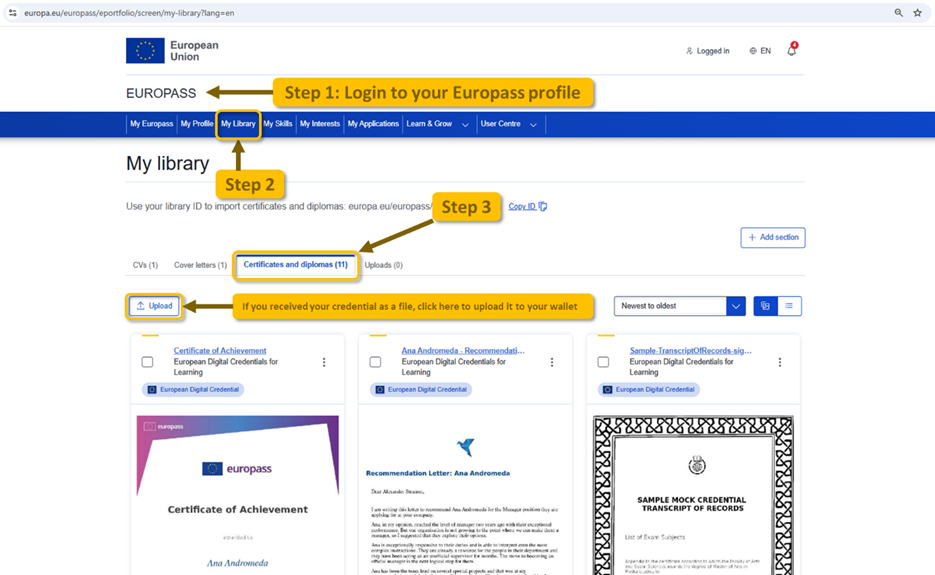
Credentials can be viewed in several ways. If a credential was issued directly to a Europass wallet, it can be accessed and managed from within the Wallet. Users can find their credentials by signing in to their Europass profile, navigating to “My Library”, and selecting “Certificates and diplomas”. If a credential is received as a file, it can either be uploaded to a Europass wallet for storage and future use, or opened directly in the EDC Viewer to inspect its contents without storing it.
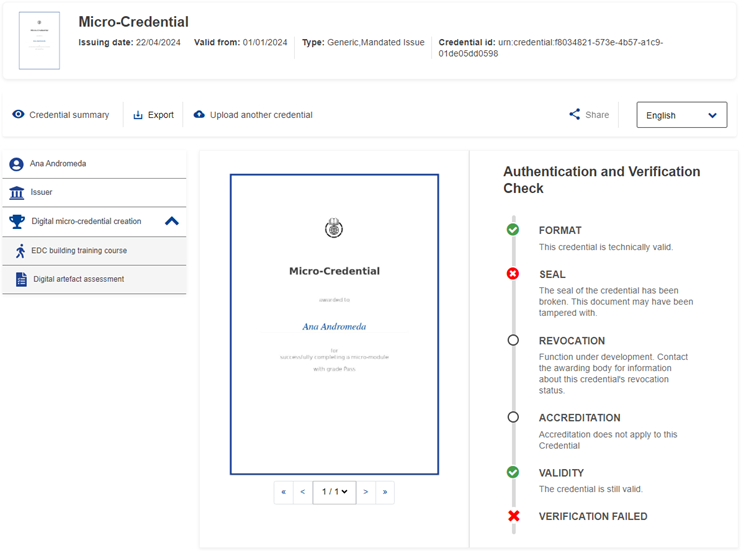
When opened, the credential is displayed in a structured format, grouping key information about the credential holder, the issuing organisation, and details about the learning outcomes. The initial visual presentation resembles a traditional certificate while also allowing access to more detailed data.
The viewing interface supports 29 languages. This means that users can navigate and contextualise the credential data in their preferred language, independently of the language of the credential content. Each time a credential is opened, verification checks are performed automatically in real time to confirm its authenticity and integrity.
Understanding verification
Each time a credential is accessed, a set of verification checks is carried out automatically to provide assurance that the credential is authentic and trustworthy. If a check fails, this is clearly indicated, allowing users and third parties to understand the status of the credential.
Sharing credentials
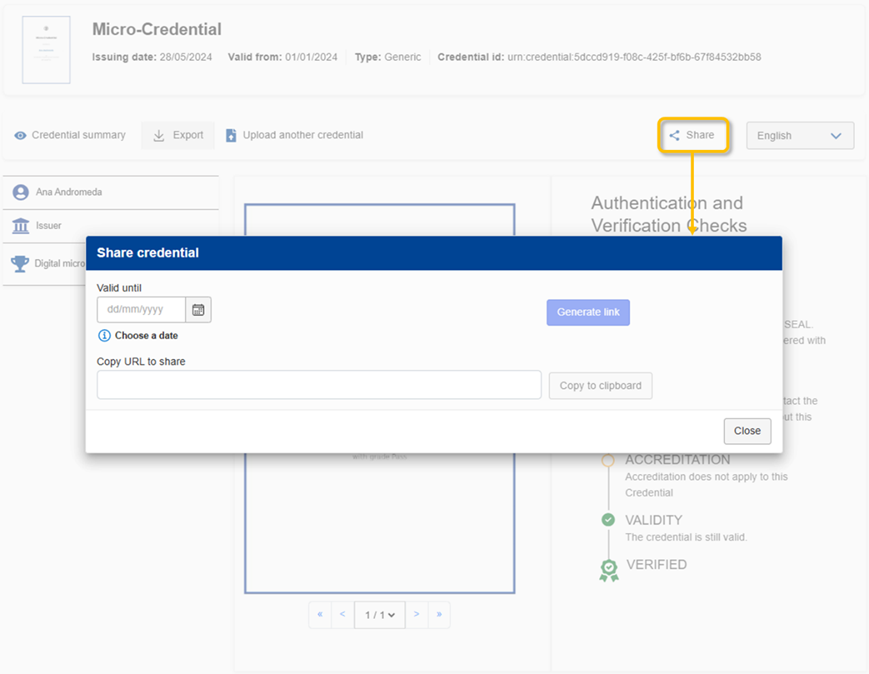
It is strongly recommended not to share the original credential file directly. Credentials stored in a wallet can be shared securely, individually or in bulk, with third parties, such as employers or education and training providers. This is done by generating a customised share link that provides temporary access to the credential in its verified online format. This approach ensures that the credential holder has full control over third party access to credential data.
Exporting credentials
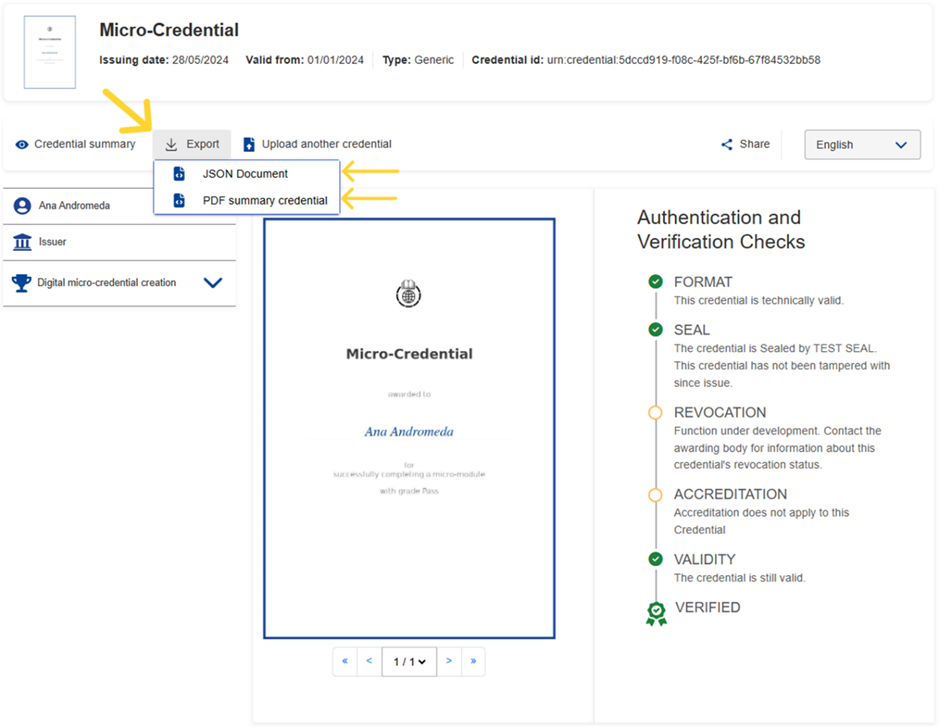
Credentials stored in a wallet can be exported as a PDF document. This provides a simplified representation of the credential, including the summary image, the authentication and verification check results at the moment of the export, and a link and QR code to provide access to the full online credential view. As the PDF represents a snapshot at a specific moment in time and is not secured, the most reliable way to verify a credential remains the online version, where validation checks are performed in real time.
If you still have questions about how to use EDCs, please feel free to contact the support team at EMPL-ELM-SUPPORT@ec.europa.eu.
 Facebook
 Twitter
 Linkedin
 Email
Email