

Using European Digital Credentials for Learning
How to access, view, share and download European Digital Credentials for Learning.
On this page you will find information on what happens after the issuing of credentials, detailing how credentials reach their recipients, how they can be viewed, shared, and how to interpret the verification checks.
For detailed information on the issuing process of credentials, please consult the ‘How to issue EDCs page’.
Once an EDC is sent to a recipient, its issuer no longer has control over the future use of the credential. Credential owners can:
Store their EDCs securely in their Europass or other EDC compliant wallet
Create a share link or PDF export to safely share their credentials with third-parties
View and verify their credentials in the EDC Viewer
Learners receive their EDC in one of four ways, depending on whether they already have a Europass account and if the Issuer has chosen to create temporary Europass wallets for the recipients. The different scenarios are listed below.
Note: What is a temporary Europass wallet?
Credential issuers can choose to create temporary Europass wallets for their learners. These will be created if a learner does not have a Europass account associated with the email address specified when issuing the credential. Credentials can be stored in temporary wallets for 6 months, during which period the learner can claim the wallet by creating a Europass account using the same email address.
Scenario 1: The learner has a Europass account associated with the email to which their credential is issued
The learner receives two emails. One informs them that an EDC has been deposited directly into their Europass wallet and includes an explanation on how to access it (see template 1 below). The second email lets them know that they have received an EDC, contains the JSON-LD credential file in attachment, and includes instructions on how to open it in the EDC viewer (see template 2 below).
Scenario 2: The learner does not have a Europass account and the Issuer chose to opt out of the temporary wallet creation
The learner receives one email with the credential attached as a JSON-LD file, and instructions on how to view and store the EDC.
Scenario 3: The learner does not have a Europass account and the issuer chose to create a temporary wallet
The learner will receive two emails. The first email contains the credential file as a JSON-LD attachment, along with instructions on how to view it using the EDC viewer. The second email provides details about the temporary Europass wallet that was created for them, which already contains the credential they received. To claim this wallet, the learner must create a Europass account using the same email address within six months of issuance.
Scenario 4: The issuer sends the credential to the learner by direct wallet deposit
The learner receives one email notification informing them that an EDC has been deposited into their Europass wallet. The email includes the unique credential URL and instructions on how to access it. When the learner opens the credential from their wallet using this URL, they will have the option to export the EDC in JSON-LD format for their own records or to store it offline.
It is recommended to store EDCs in an online wallet. The Europass ePortfolio offers a credential wallet by default, but issuers can deposit credentials to other standard-compliant wallets as well (note however that the information on this page is centred around the use of the Europass wallet).
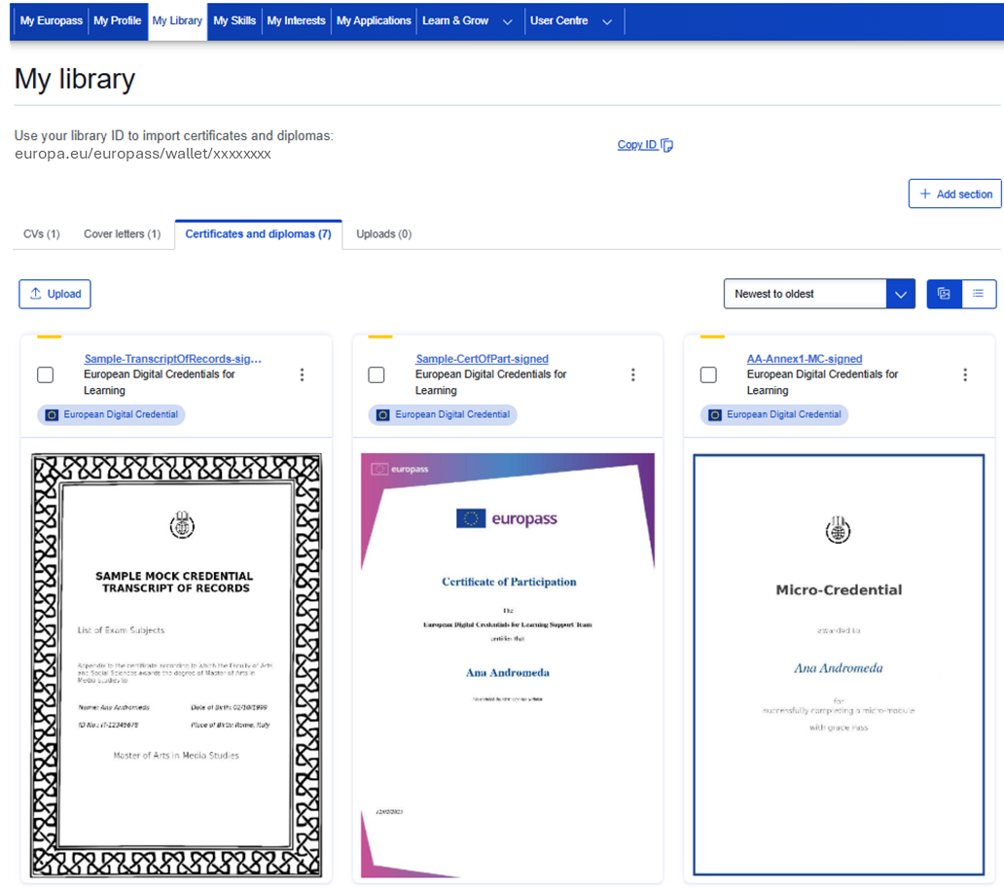
The Europass wallet is readily incorporated in all Europass accounts, that anyone can freely create without any restrictions. The wallet is accessible in the ‘My library’ section of the ePortfolio, under the title ‘Certificates and Diplomas’.
As shown on the screenshot above, an account holder can find, and copy, their wallet ID from the top of their ‘My Library’ page. Please note that the complete wallet ID address has the following full URL format: europa.eu/europass/wallet/xxxxxxxx, ending with the Europass account holder’s 8-digit alphanumerical EU login ID.
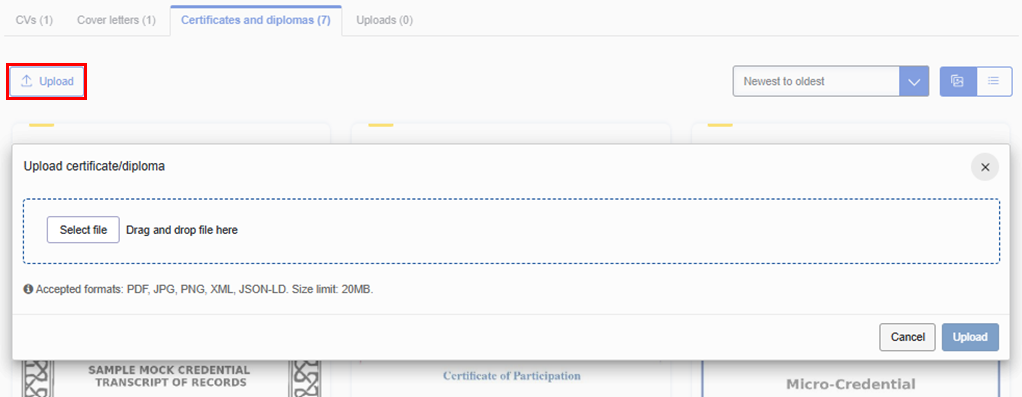
To store a credential in their Europass wallet, users can either receive it there directly (if the credential issuer sent the EDC to the wallet ID or if a wallet is already linked to the delivery email address), or they can upload the credential file manually, using the ‘Upload’ button in the top right corner of the section.
From their Europass wallet, recipients can view and share their credentials with third parties. The option to securely share credentials is only available from the Europass wallet.
Note: credentials can be stored in Europass indefinitely. However, to keep their Europass account, users will need to access their account at least every 5 years. If an account has not been accessed for close to 5 years, account owners will be notified via email about needing to log in to keep their account active. To learn more about the protection of personal data processed by the Europass platform click here.
Additionally, if credentials are stored in the wallet, the validity of credentials will automatically be extended before the applied electronic seal expires. This is done via an automatic re-signing mechanism.
Storing the credential offline
Credential recipients can choose to store their credentials offline, without uploading them to Europass or another compliant wallet. They will still be able to view the credential by using the EDC Viewer, however they will not be able to download a PDF version, or generate a secure share link to send it to third parties.
Importantly, if the credential is stored offline, its owner should periodically upload it to the EDC Viewer to extend its validity before the expiration of the seal. Even if a credential itself does not have an expiry date; its overall validity is determined by the validity of the electronic seal, which can only be maintained by periodical signature extension using a qualified timestamp. As mentioned above, if the credential is stored in a compliant wallet its validity will be automatically extended before the seal expires.


You can export your European Digital Credentials for Learning as a PDF document. You can do this either directly from the Europass library, or from the Viewer, as shown below.

If something remains unclear, our support team is here to help you. Reach out to us via email with your question or issue at EMPL-ELM-SUPPORT@ec.europa.eu, we will be happy to assist you.
 Facebook
 Twitter
 Linkedin
 Email